Your team already has an AI assistant. It writes emails, summarises documents and answers questions. What it cannot do is tell you what it costs to move two pallets from Dandenong to Townsville tomorrow, because it has no idea what your carrier rates are.
MCP is the open standard that fixes that. This post explains what an MCP is in plain language, then walks through building one yourself, on top of the FreightExchange API, so that a single server gives your AI access to every carrier on our network.
If you are not technical, read the first half and stop at “How to build an MCP server for freight”. Everything you need is there.
What is an MCP server?
MCP stands for Model Context Protocol. It is an open standard that lets an AI assistant use software tools safely and predictably.
Think of it as a power point. Before there were standard power points, every appliance needed its own wiring. MCP does the same job for AI. Instead of every AI product building a custom connection to every piece of software, both sides agree on one shape of plug.
Anthropic published MCP as an open standard in November 2024. It is not a Claude feature or an OpenAI feature. It is a public specification, currently at revision 2026-07-28, and the tooling around it is now very large. The maintainers report close to half a billion SDK downloads a month across the main language SDKs.
A working MCP setup has two halves:
The client. The AI application. Claude, an internal agent your dev team built, a copilot inside your ERP.
The server. A small piece of software that sits in front of a system and describes, in plain terms, what that system can do. “You can request a quote. You need an origin postcode, a destination postcode and item dimensions. You will get back prices by carrier.”
The AI reads those descriptions, decides which one it needs, fills in the fields and calls it. It does not guess. It does not scrape a screen. It calls a real function against a real system and gets structured data back.
The important part for this post: anyone can write a server. It is not a product you buy. It is a wrapper you build around an API you already have access to, and a small one. The example further down is about eighty lines.
Why MCP matters more in freight than almost anywhere else
Freight has a wiring problem that most industries do not.
A mid sized shipper in Australia might use six carriers. Each one has its own API, its own authentication, its own idea of what a “service level” is, its own label format, its own tracking event vocabulary and its own manifest process. Some have no API at all and expect a portal login or a spreadsheet.
Now add the systems on the other side. An ERP, a WMS, a store. A customer service desk. If every system talks to every carrier, six carriers and four systems is twenty four separate integrations to build and, worse, to maintain forever.
Bring AI into that picture and it gets harder, not easier. If you wrote one MCP server per carrier, you would be back to maintaining six of them, each with its own auth, its own field names and its own quirks. The maths goes the wrong way fast.
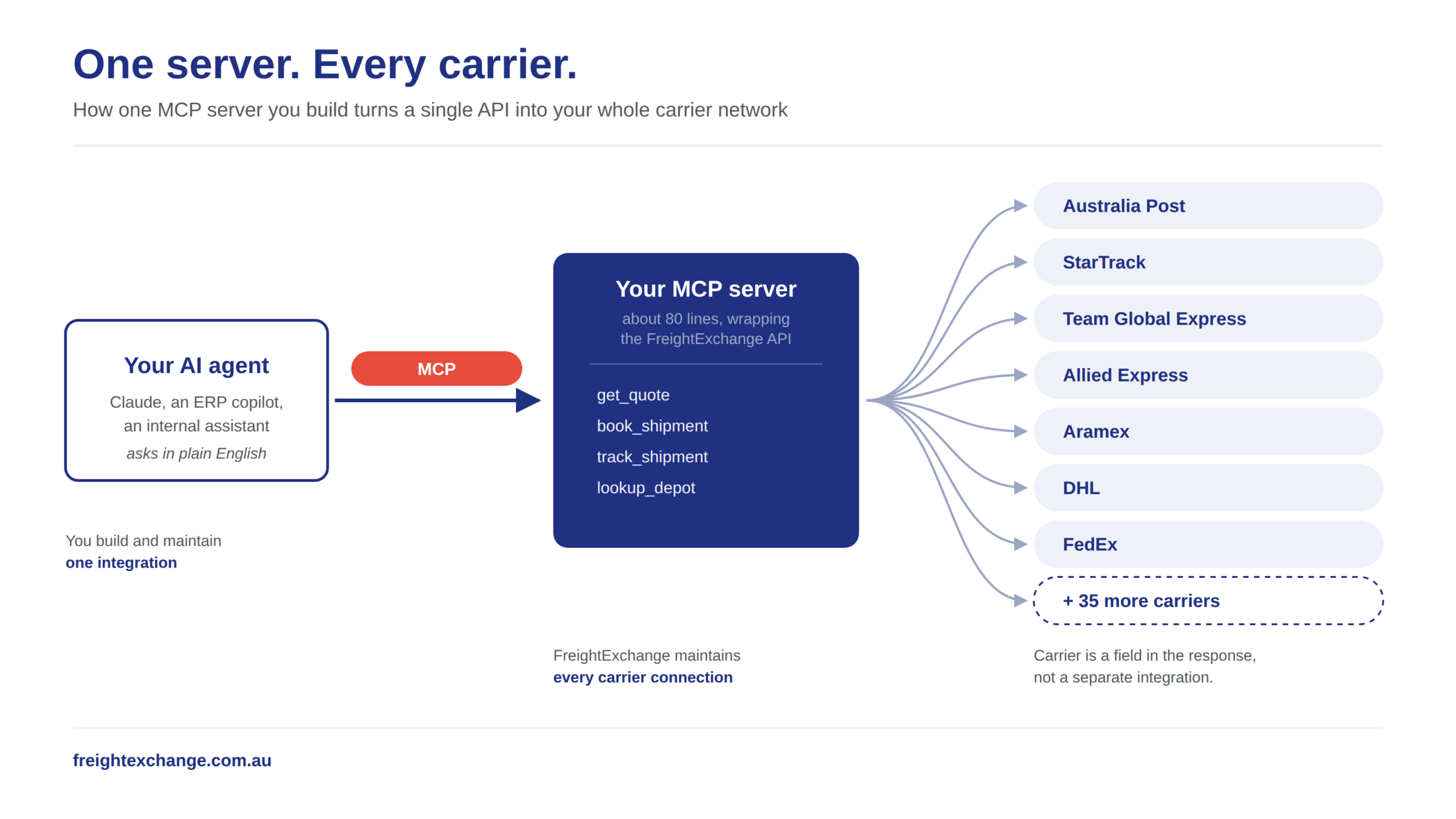
This is where the normalised layer earns its keep. FreightExchange already maintains the carrier integrations. More than 40 carriers across Australia, New Zealand and international lanes sit behind one API. Australia Post, StarTrack, Team Global Express, Allied Express, Aramex, DHL, Northline, CouriersPlease, Hunter Express, FedEx, TNT and the rest. One quote request, prices from all of them, in one shape.
So you write one MCP server, against one API, and your agent can reach every carrier you ship with. Adding a carrier to your account does not mean touching the server.
One server. Every carrier. That is the whole idea.

What you can ask an AI agent to do with freight
The conversations stop being about software and start being about freight.
“What would it cost to send three pallets, 1200 by 1000 by 1400, 400kg each, from our Laverton warehouse to a residential address in Cairns, picking up Thursday?”
The agent calls your quote tool, gets back every carrier price with transit times, and answers in a sentence. No portal. No spreadsheet. No one switching between six carrier websites.
“Book the cheapest option that arrives before the 14th, put the PO number on it as the reference, and email the labels to the warehouse.”
The agent calls your booking tool with the price it chose and the reference you gave it, and the labels go where you said.
“Which of yesterday’s consignments have not moved since pickup scan?”
The agent calls tracking across the jobs and tells you the three that are sitting still.
None of that is magic. Every one of those is a normal API call behind the same platform functions your team already uses in the browser. What MCP changes is who can make it. Previously that required a developer to write code every time. Now a developer writes the server once, and an operations person asks in English.
Three limits to know before you build
AI should not book freight unsupervised on day one. A quote is read only and safe. A booking spends money and dispatches a truck. The MCP specification is explicit that hosts must get the user’s consent before invoking any tool, and every serious client implements that as an approval prompt. Keep it on for anything that writes. Start with quoting and tracking, get comfortable, then widen it.
Rate coverage varies by carrier. Some carriers return live rates through their own API. Many operate on rates loaded into FreightExchange from your negotiated rate card. Both come back through the same quote call, but if your rate card is out of date, an AI agent will confidently quote an out of date price. The data discipline still matters.
Not everything in the platform is in the public API. Quote, book, track and depot lookup are documented and stable. Manifest close and pickup booking are not in the public REST reference, so an agent cannot do those. Build for what the API actually exposes, and leave the rest in the browser for now.
How to build an MCP server for freight
Four steps, and the whole thing is smaller than most people expect.
Step 1: scope it to four tools
Start with the four things the public API documents:
| Tool | What it does | Endpoint |
|---|---|---|
get_quote | Prices a shipment across every carrier available to your account | POST /2.0/quote |
book_shipment | Books a quoted price, or books directly without a prior quote | POST /2.0/book and POST /2.0/book/direct |
track_shipment | Latest status, or the full event history | GET /2.0/track/{jobId}/status and GET /2.0/track/{jobId} |
lookup_depot | Finds depots for depot drop off or collection | GET /2.0/support/depotlookup |
Labels are not a fifth tool. They come back on the booking response as shippingLabelUrl and shippingDocs, or by email or webhook, depending on how you book.
The critical point is what is not in that table: carrier names. There is no book_with_startrack tool and no track_allied_express tool. Carrier selection is a field in the response, not a different integration. The agent asks for a quote, gets back a priceResult array where each entry carries carrierName, serviceName, netPrice, minTransitTime and maxTransitTime, and picks one. Adding a carrier to your account adds rows to that array. It does not change your tool surface, and it does not require an agent update.
That is what “one server, every carrier” actually means. You do not run 40 MCP servers. You run one, and the carrier fan out happens behind it.
Step 2: pick a transport and handle authentication
The current MCP specification defines two standard transports: stdio, where the client launches your server as a subprocess and they exchange newline delimited JSON-RPC over standard streams, and Streamable HTTP, where each message is an HTTP POST to a single endpoint. Custom transports are permitted, but almost nobody needs one.
For an internal tool, start with stdio. It runs on the machine that needs it, your token never leaves that machine, and there is no service to deploy or secure. Move to Streamable HTTP when more than one person needs it.
The FreightExchange API does not use an HTTP auth header. It takes a securityToken, in the request body on the POST calls and as a query parameter on the GET tracking and depot calls. You get separate tokens for the demo and live environments, so build against demo first.
Read the token from the environment and inject it server side. Never put it in a tool schema and never return it. The agent should be able to book a shipment without ever being able to read the credential that let it.
For local stdio use, the client config looks like this:
{
  "mcpServers": {
    "freight": {
      "command": "node",
      "args": ["/path/to/your/server/index.js"],
      "env": {
        "FEX_SECURITY_TOKEN": "your_token_here",
        "FEX_BASE_URL": "https://apidemo.freightexchange.com.au"
      }
    }
  }
}
Point FEX_BASE_URL at https://api.freightexchange.com.au when you move from demo to live.
Step 3: write the quote tool
Here is get_quote in the v2 TypeScript SDK. This is the whole pattern. The other three tools are the same thing with different fields. Registration only is shown, so add your transport and a server.connect call to run it.
import { McpServer } from "@modelcontextprotocol/server";
import * as z from "zod/v4";

const server = new McpServer({
  name: "freight",
  version: "1.0.0",
});

const BASE = process.env.FEX_BASE_URL ?? "https://apidemo.freightexchange.com.au";
const TOKEN = process.env.FEX_SECURITY_TOKEN;
if (!TOKEN) throw new Error("FEX_SECURITY_TOKEN is not set");

server.registerTool(
  "get_quote",
  {
    title: "Get freight quote",
    description:
      "Price a domestic or international shipment across every carrier " +
      "available on the account. Returns one row per carrier service with " +
      "net price, gross price and transit time range. Read only.",
    inputSchema: z.object({
      pickupDate: z.string().describe("Pickup date, YYYY-MM-DD"),
      originCity: z.string(),
      originPostCode: z.string(),
      originCountryCode: z.string().default("AU"),
      originResidential: z.boolean().default(false),
      destinationCity: z.string(),
      destinationPostCode: z.string(),
      destinationCountryCode: z.string().default("AU"),
      destinationResidential: z.boolean().default(false),
      freightType: z.enum(["PALLETS", "OTHER"]),
      insuranceValue: z.number().default(0),
      items: z
        .array(
          z.object({
            length: z.number().describe("cm"),
            width: z.number().describe("cm"),
            height: z.number().describe("cm"),
            weight: z.number().describe("kg"),
            quantity: z.number().int(),
          })
        )
        .min(1),
    }),
  },
  async (args) => {
    const res = await fetch(`${BASE}/2.0/quote`, {
      method: "POST",
      headers: { "Content-Type": "application/json" },
      body: JSON.stringify({
        ...args,
        resultOutput: "FULL",
        securityToken: TOKEN,
      }),
    });

    const data = await res.json();

    if (!data.success) {
      return {
        content: [{ type: "text", text: `Quote failed: ${JSON.stringify(data)}` }],
        isError: true,
      };
    }

    const options = data.priceResult.map((p) => ({
      priceId: p.priceId,
      carrier: p.carrierName,
      service: p.serviceName,
      netPrice: p.netPrice,
      grossPrice: p.grossPrice,
      transitDays: `${p.minTransitTime} to ${p.maxTransitTime}`,
    }));

    return {
      content: [
        {
          type: "text",
          text: JSON.stringify({ quoteId: data.quoteId, options }, null, 2),
        },
      ],
    };
  }
);
Three things in there are worth copying into any MCP server you write, freight or not.
The description is the interface. The model chooses tools by reading descriptions. “Read only” in that text is what stops an agent reaching for the quote tool when it should be booking, and reaching for the booking tool when it should be quoting. Write descriptions for the model, not for a human skimming a README.
Return structured, trimmed data. The raw quote response carries fields the model has no use for. Passing the whole payload back wastes context and gives the model more chances to misread it. Return the columns a decision needs, and nothing else.
Keep the credential out of the return path. TOKEN is read from the environment and appended server side. It appears in no schema and no response.
Step 4: add booking, which is the part that spends money
The booking tool follows the same pattern against POST /2.0/book. The fields that matter:
quoteIdfrom the quote you just ran, andpriceIdfor the specific carrier service. OmitpriceIdand FreightExchange books the cheapest option for that quote. For an agent, always passpriceIdexplicitly. “Cheapest” is a decision a person should make knowingly.waitForConfirmation. Set true and the call blocks until the carrier confirms, returningtrackingNumberandshippingLabelUrlin the response. Set false and you get ajobIdimmediately, with no labels in that response. Labels then reach you bylabelDeliveryMethod, which isEMAIL,WEBHOOKorNONE, or by polling once they exist.- For agent use,
waitForConfirmation: trueis usually right. An agent that returns a job number and no confirmation leaves a person to go and check the portal, which defeats the purpose.
Mark this tool as destructive in its annotations so the client prompts for approval. Be clear about what that is and is not: the specification says descriptions and annotations from untrusted servers should be treated as untrusted, so an annotation is guidance to your own client, not a security boundary. The real boundary is the token, its scope, and your own approval flow.
Webhooks and the asynchronous path
If you set waitForConfirmation: false and supply labelDeliveryWebhook, FreightExchange POSTs the job details and the label to your endpoint once the carrier confirms, and expects HTTP 200 back. That is the right shape for high volume batch work. It is the wrong shape for a conversational agent, which has no endpoint to receive a callback. Use the synchronous path in the MCP server and keep the webhook path in your batch flows.
Ship it small: what to build first
The fastest useful version of this is one tool, get_quote, read only, running over stdio on one developer’s machine, pointed at the demo environment. That is an afternoon. It is also the version that proves whether your team actually wants this before anyone builds a service for it.
Add tracking next, because it is also read only. Add booking last, behind an approval prompt, once the first two have been in real use for a few weeks.
Get started with the FreightExchange API
The REST documentation is public, and everything above works against it today. API access is part of the paid FreightExchange plan, and tokens for the demo and live environments come with it.
If you want a hand scoping it, or you are not sure whether your carrier mix is fully covered, get in touch.
The carrier integration problem has not changed in twenty years. What has changed is who gets to use the solution. It used to be developers only, every time. Now a developer builds it once, and anyone who can describe what they need to ship can use it.